Agent activity and controls
This page shows how to stop an agent, where to see everything your agents did, how to download it, and what happens when Hydrata pauses agents.
Stop an agent
Open the Agent keys page while signed in. Your agent keys and your one-click connections are both listed there. Press Revoke beside the one you want to stop: its next request is refused. To stop all of them, press Revoke all. Revoking does not cancel a run that has already started; cancel it from the scenario in the map. See Revoke a key or a connection.
See what your agents did
Open https://hydrata.com/agents/activity/, or follow See everything your agent keys have done on the Agent keys page. The page is called Your agent activity. It shows the rows recorded under your own account. To see what a colleague's agent did on a project you share, open that project's own view.
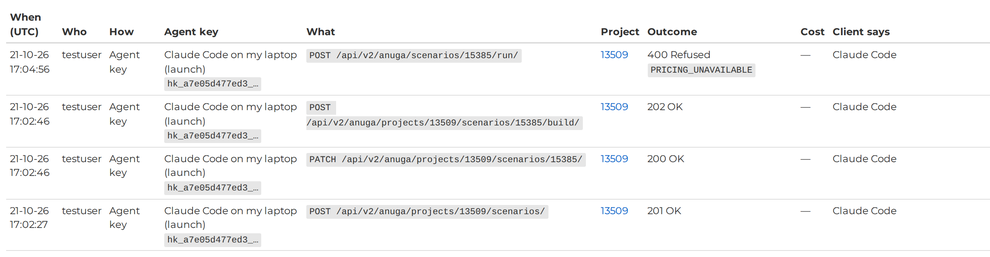
The table shows the newest 500 rows. Its columns are:
| Column | What it shows |
|---|---|
| When (UTC) | Date and time |
| Who | The person whose account it ran under |
| How | The credential used: Agent key; Password (HTTP Basic), which means a script or tool that signed in with a username and password; Browser session; or one of Hydrata's own actions |
| Agent key | The key or connection's name, level and the start of the key |
| What | The change made (the request method and address) or the kind of action |
| Project | The project's number, linked to its own view |
| Outcome | OK, Refused or Failed, with the refusal code if there is one |
| Cost | The quoted cost, for runs |
| Client says | The label the agent software gave itself. Hydrata does not verify it |
Below the buttons, a list of projects with agent activity links to each project's own view.
Activity on one project
Each project has its own view, Agent activity on project {id}, at https://hydrata.com/agents/activity/project/<id>/, where <id> is the project's number. It shows everything recorded on that project, whoever did it, not just your own rows. Its owner and members can open it. Anyone else gets a "not found" page. There is no link to it from the map: use the list on the activity page, or the address above.
Download the log
Use Download CSV or Download JSON on the activity page. A download holds every row, not just the newest 500.
To download only part of the log, add filters to the end of the download address: by project (project), by key (grant, the characters after hk_ shown in the Agent key column) and by date (since, an ISO date or date-time), for example ?project=123&since=2026-10-01. Join several with &. The grant and since filters also work on the activity page itself.
What is recorded
- Every write by a live agent key or connection, including ones that were refused. A key that keeps being refused is summarised after a while instead of filling the log. Attempts with a revoked or unknown key are not recorded, as there is no key to attach them to.
- Every write made by a script or tool that signed in with your username and password.
- Things people do about agents: creating or revoking keys, revoking all, reviewing an input, consenting to a run's cost, publishing, changing a limit.
What is not recorded
- Reads: the log shows what was changed, not what was looked at.
- What you typed to the agent, and what it replied.
- Ordinary edits you make in the browser.
What Hydrata records about agent tool calls
Separately from this log, Hydrata keeps its own record of each tool call an agent makes, reads included: which account and connection made it, when, which tool it used, and whether it worked. Samples of what the agent sent are kept too, and may include personal data you put in your inputs, such as a project name, a place or a note. These records are for the Hydrata team only, to find tools that break and tools that are missing. They do not appear on the activity page. They are kept indefinitely, never sold, and shared only with Amazon Web Services, which hosts them. See the privacy policy.
The agent never sends Hydrata what you typed to it, so Hydrata cannot record your conversation.
The log is append-only: rows cannot be edited or deleted. It is kept indefinitely. If an account is deleted, its rows are kept with the person's details removed.
When Hydrata pauses agents
Hydrata can pause all agent launches, or all agent writes, across the site. Pauses are rare. They can be set by hand, and launches also pause automatically if agent spending across the site looks unusual.
During a pause on launches, an agent cannot build, prepare terrain, or start or retry a run, and those requests are refused with AGENT_PAUSED; it can still read, edit and cancel a run. During a pause on all agent writes, an agent can only read. The agent is asked to tell you and not to retry. Using Hydrata in the browser, and scripts that use your password, are not affected.
If an agent is told to slow down
When an agent sends too many requests in a short time, Hydrata refuses them for a while (the agent sees HTTP 429). A well-behaved agent waits and tries again. You do not need to do anything.