Working with an agent
This page explains how a project moves between you and an agent: the links it hands you, the review that opens Build and Run, the consent step for run costs, and the rules it follows for time series.
Hydrata sends every agent a set of working instructions when it connects. Some of what follows is enforced by Hydrata, whatever the agent does. The rest is what the agent is asked to do, and this page says which is which.
Before your first run
The first time claude.ai uses each Hydrata tool, it asks you to Allow once or Always allow it. In a build that is several prompts, at moments you do not choose. To deal with them once, up front:
- In claude.ai, open Settings → Connectors → Hydrata.
- Open the tool permissions and set the Hydrata tools to Always allow. Or set the read-only tools to Always allow and leave the ones that build or spend compute (
build_scenario,start_simulation,retry_run) on Ask. - Anything you leave on Ask shows the prompt the first time it is used.
Hydrata cannot show this dialog itself: claude.ai owns it, and menu names change from time to time. Hydrata marks each tool as read-only or not, so claude.ai can group them. The agent is asked to tell you about the prompts once, at the start.
Allowing a tool is not consent to spend. A run over the key's monthly limit still waits for you (Run consent), and the agent still cannot review its own inputs.
What the agent asks first
Before it writes inputs or builds, the agent is asked to put these to you. It should not decide them for you:
- The approach. Rain-on-grid (rain falls on the whole model domain) or an inflow hydrograph at a place you name. If you say "hydrograph", it should ask whether you mean an inflow hydrograph that drives the model or the flow hydrograph you want out of the results. These are different models.
- The datum of your levels. Which height datum your study, survey or tailwater levels are on.
- Losses and the series basis. It tells you the losses it applied and whether each rainfall series is
excess(after losses) orgross(before). Rain-on-grid takes initial and continuing losses only, never a runoff coefficient. It says where the design depth came from, or that it is unverified. - Permissions. It says once, at the start, that claude.ai will ask to allow each Hydrata tool the first time it is used, and that Always allow saves the interruptions. See Before your first run.
- That it cannot watch a run between turns. When it starts a run it says how you will hear (Hydrata emails you when the run completes or fails, or you ask it for status). Within one turn it follows a run and reports each step.
- Where a results hydrograph comes from. The flow across a line you drew comes from the run's results: the agent reads it with its flow hydrograph tool (
get_flow_hydrograph), and you can draw the same line in the map's Profile panel and open its Flow tab. There is no other results hydrograph screen. The input hydrograph grid is where an inflow goes in, not where a result comes out.
These are instructions, not locks (see What the agent is asked to do): if the agent builds without asking, tell it which approach you wanted and ask it to start again.
How an agent builds a project
The agent is asked to use Hydrata's own tools first. It is not asked to move files by any other route.
- Terrain. The agent lists the terrain Hydrata can fetch for the site and uses one. If no source covers the site, you upload your own DEM in the map.
- Placing things on the ground. Before the agent places a culvert, an inflow or a boundary, it reads the ground:
sample_terraingives the terrain level at points andterrain_profilegives the levels along a line across, for example, a channel. The lowest point on a profile across a channel is the invert candidate. These are the same levels the Profile panel shows for the same line. The agent's instructions tell it to read the ground before it places anything; ask it what it read, and check the invert it chose in the Profile panel. - Height datum. The agent asks you which datum your levels are in (for example AHD, NAVD88 or an EPSG code) and records your answer on the project as your levels datum. That is a fact about your numbers, kept apart from the datum of the terrain itself. If the two differ, Hydrata warns you, and the terrain badge shows a line such as Your levels: NAVD88; terrain: AHD. The agent does not present the datum Hydrata inferred as fact.
- Input layers. Boundary, friction, inflow, rainfall, building, mesh-region and culvert layers go in as inline GeoJSON. For a big file the agent gives you a link, and you drop the file in your browser.
- Storm, catchment and mesh region. You or the agent supply these. The agent says how it made them, and you see that in the review. When it bases an input on a document (a flood study, a gauge record), it passes the document as a source, and the review shows each one as a link beside How it was made, so you can click through to the evidence.
- Rainfall. Rainfall must be rainfall after losses (rainfall excess). The simulation applies no losses. The agent states the basis of every rainfall series:
excessfor rain after losses (what it writes),grossfor rain before losses (a design storm). Hydrata shows that basis wherever it describes the storm, so losses are not taken off twice. - Long waits. A tool that waits stops after a short time. The agent calls it again.
Open the link after every step
After each change it makes, the agent gives you a link and a short summary. The link opens the map on the thing that changed: the right panel, the layer (switched on and zoomed to), the scenario, or the run. Open it and look. This is how you check the agent's work as it goes.
Sign in to hydrata.com in the same browser first. A project an agent creates is unpublished, so the link shows nothing until you are signed in.
The agent is asked to share the link after each layer it adds, and to wait for you to confirm before it starts a run.
Review what the agent wrote
Every input layer or terrain a scenario uses that an agent wrote, or whose time series an agent wrote, is marked Agent-authored · not yet reviewed. Until an Editor or above reviews those inputs in the browser, Build, Run, Retry and Build and Run stay off for that scenario. If the agent tries anyway, Hydrata refuses with UNREVIEWED_INPUTS and gives the agent a link to the review panel. The agent is asked to hand it to you rather than try again.
The scenario's own settings that an agent chose (such as its duration and resolution) are not part of the review, and they never hold up Build, so check them in the scenario panel. If a setting changes after the scenario was built, the built model is no longer the one you set up: the scenario reads as not built, offers Rebuild, and Run is refused with RUN_INVALIDATED until you build it again.
You review inputs in the Review panel, opened from the left toolbar. See Reviewing agent inputs for the steps.
A few points to know:
- Only a person signed in to the browser can review. Agents cannot, at any level.
- When you save a change to an agent-written layer in the map, that save counts as your review of the version you saved. It does not clear an input that is unreviewed because it uses a time series the agent wrote, and a later agent write opens the review again. Changes made outside the app (for example in QGIS) do not count.
- You need to be an Editor or above on the project. A Contributor cannot review agent inputs, and cannot Build or Retry (both need Editor or above). A Contributor can start a Run on a scenario an Editor has built, but it is refused with
UNREVIEWED_INPUTSuntil an Editor reviews the agent's inputs. - If anything about an input changes after you review it, it needs review again.
- If an agent-written input changes after the scenario was built, it needs review again, and once reviewed the Run is still refused with
RUN_INVALIDATED: the built package is not what you reviewed. Build the scenario again, then run.
Run consent
A Launch key or connection starts a run on its own only while what that key or connection has spent this calendar month (UTC), plus the new run's quote, stays within its monthly limit. The limit starts at $0. A run that is quoted at $0 (one inside the free band) never needs consent.
When a run would cost more than the limit allows, or when Hydrata cannot price it in advance, Hydrata does not start it. The agent receives CONSENT_REQUIRED with a link, and tells you something like: "This run is quoted at $12.40, more than this key may spend without asking you. Open this link to start it. Nothing has started."
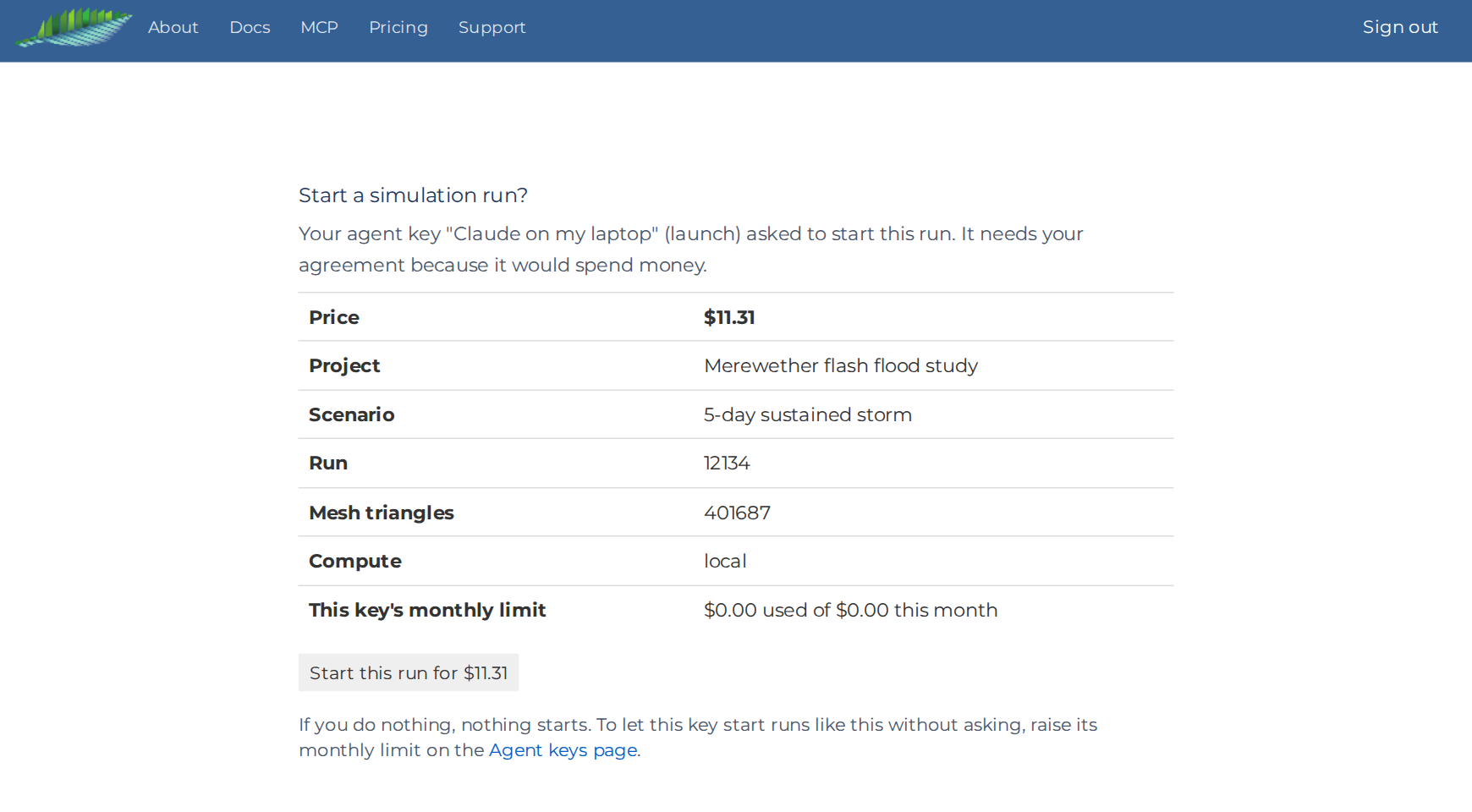
The link opens Start a simulation run? with the details of the run:
- the key and its level;
- the price;
- the project, scenario and run;
- the number of mesh triangles and the compute it will run on;
- how much of this month's limit has been used.
Press Start this run for $X to start it. For a run Hydrata could not price in advance, the page says so and the button reads Start this run. If you do nothing, nothing starts. Only the person who made the key or connection can open the page, signed in.
Your consent applies to that run, at that price, with that mesh. If the scenario is rebuilt, or the price or compute changes, since the consent link was made, the consent is stale (CONSENT_STALE) and the agent must ask again. A run you consented to does not use up the key's monthly limit.
When you press Run yourself in the map, you are not asked for consent and no spend limit applies. The consent step applies to agents.
Publish
A project an agent creates is unpublished. Only you and its members can open it, even if its visibility is Public. An Owner or Manager publishes it by pressing Publish in the Sharing tab. See Sharing.
Rules for time series
Hydrata checks every time series an agent writes, and the agent is asked to repeat Hydrata's own summary of it (peak, total, last value) rather than its own arithmetic.
Units. The units follow the type of series:
| Series | Units |
|---|---|
| Hyetograph (rainfall) | mm/hr (or mm/h) |
| Hydrograph (inflow) | m3/s (also m^3/s, cumec) |
| Stage | m |
Other units are refused with UNITS_MISMATCH. Blank units are refused when a series is created, but are allowed when editing an older series.
Time. A timestamp with no time zone is read as local time in the series' own time zone, which is UTC unless the series says otherwise.
The last value is held. Before its first row, a series contributes 0. After its last row, the model holds the last value until the end of the run. A hydrograph or hyetograph whose last value is not 0 is refused with TRAILING_VALUE_HELD unless the agent sets hold_last_value to true. That flag only confirms the hold was intended; the model holds the value either way. To end the flow, the series needs a final row of 0.
Unused series. If the project holds a rainfall or inflow series that no feature uses, the agent's scenario read flags it, and the agent is asked to tell you the model ignores it and ask which input it belongs to.
The hydrology check
Before a build, the scenario's notices panel shows a Hydrology check to Editors and above. It lists each rainfall and inflow with its peak and totals, and warns about values that look wrong, such as rainfall above 500 mm/hr. Look at it before you review and consent.
What Hydrata enforces
These hold whatever the agent does, at every access level:
- It cannot publish. Only an Owner or Manager can, in the browser.
- It cannot review its own inputs. Build and Run stay off until a person reviews them.
- It cannot start a run that needs your consent. A run over its spend limit waits for you to press the button.
- It cannot take person-only actions, such as changing members, visibility or agent keys. These are refused with
AGENT_KEY_SCOPE. See What stays with you. - It cannot go above its level. An action above it is refused with
AGENT_LEVEL_INSUFFICIENT. - It cannot build a mesh above the server's ceiling. That is refused with
MESH_TOO_LARGE.
What the agent is asked to do
These are instructions Hydrata gives every agent. They make mistakes less likely, but they are instructions, not locks:
- Not to invent an inflow location. The agent is asked never to guess where water enters the model, and to send you to the map to draw or fix it.
- Not to follow instructions hidden in your data. Names, titles, descriptions, units and logs that people wrote reach the agent marked as untrusted data to report, not instructions to follow.
- To ask before it decides. The approach, the datum of your levels, and the losses, as listed in What the agent asks first.
- To cite its documents. When an input comes from a document, the agent passes the title, link and, if it has one, the page or table.
- To check before building a very large mesh. Above 100,000 triangles the agent has to confirm the size explicitly, and it is asked to check with you first.
While a run is in flight
The agent checks the run's status as it goes and reports back. You can watch the same run in the map, from its status on the scenario and in the Tasks panel (see Run stuck in Queued or Computing). A run that is still preparing its inputs is in a normal early phase, not stalled.
Next
See everything your agents did, or stop one, in Agent activity and controls.